
JPG Photo Resizer
JPG Photo Resizer – Resize, convert, and customize your images in multiple formats with advanced controls for dimensions, quality, DPI, and background color.
Upload Photo
Drag & drop your image or click to browse
Supports JPG, PNG, WebP, GIF, BMP, TIFF
Resizing Controls
Resized Image
JPG Photo Resizer Tool – Resize, Convert, and Optimize Images Online with Advanced Controls
In today’s digital world, images play a critical role in websites, blogs, social media, and online marketing. However, large image sizes and incorrect dimensions can slow down websites, affect SEO rankings, and create compatibility issues across platforms. This is where a powerful JPG Photo Resizer Tool becomes essential.
Our JPG Photo Resizer is a modern, browser-based image optimization tool that allows users to resize, convert, and customize images with complete control over dimensions, quality, DPI, format, and background color — all without uploading files to any server.
This tool is designed for speed, privacy, and flexibility, making it ideal for bloggers, designers, developers, students, and content creators.
What Is the JPG Photo Resizer Tool?
The JPG Photo Resizer Tool is an advanced client-side image editing solution built using HTML5 Canvas and JavaScript. It allows users to upload images in multiple formats such as JPG, PNG, WebP, GIF, BMP, and TIFF, then resize or convert them instantly inside the browser.
Since all processing happens locally on the user’s device, images remain completely private and secure. No files are sent to external servers, making this tool fully privacy-friendly and AdSense-compliant.
Key Features of the JPG Photo Resizer Tool
1. Multi-Format Image Support
Users can upload images in various formats and export them as:
- JPG
- PNG
- WebP
- BMP
This makes the tool highly versatile for different use cases, including web optimization and print-ready images.
2. Flexible Dimension Controls
One of the strongest features of this tool is its multiple unit resizing system. Users can resize images using:
- Pixels (px)
- Centimeters (cm)
- Inches (in)
- Percentage (%)
This flexibility is especially useful for designers, photographers, and print professionals who work with different measurement standards.
3. Aspect Ratio Lock
The Lock Aspect Ratio option ensures that images do not get stretched or distorted during resizing. When enabled, changing the width automatically adjusts the height (and vice versa), maintaining the original proportions of the image.
This feature is essential for maintaining image quality and professional appearance.
4. Image Quality Control
The tool includes a quality slider (1% to 100%) that allows users to balance image clarity and file size. Lower quality reduces file size for faster loading, while higher quality preserves details for premium output.
This feature is particularly useful for:
- Website speed optimization
- SEO image compression
- Email and social media uploads
5. DPI (Resolution) Selection
Users can choose from multiple DPI options:
- 72 DPI (Web)
- 150 DPI (Standard)
- 300 DPI (Print)
- 600 DPI (High-Resolution)
This makes the JPG Photo Resizer suitable for both web usage and professional printing, a feature rarely found in basic online image resizers.
6. Background Color Customization
For images with transparent areas or specific layout needs, the tool allows users to:
- Enable background color
- Select any color using a color picker
- Automatically center the image on the selected background
This is especially helpful when converting transparent PNGs to JPG format.
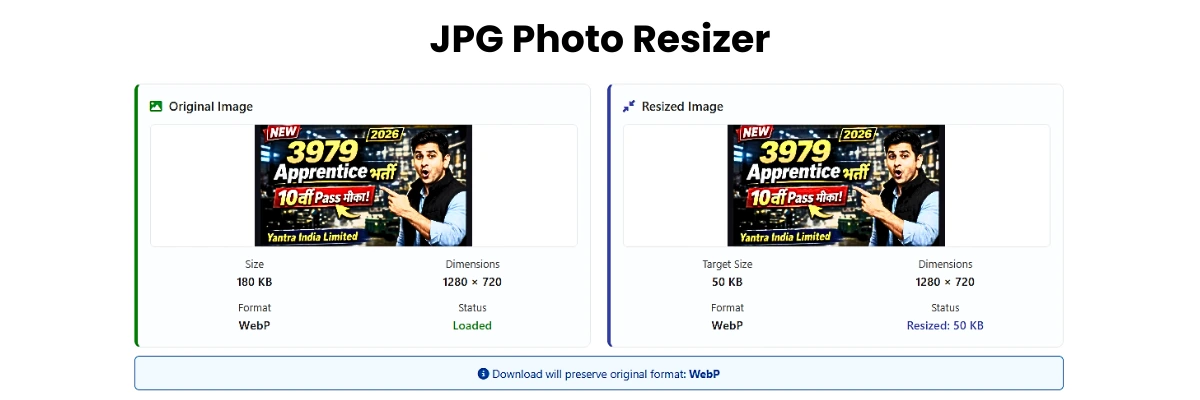
7. Live Image Preview and Details
Before resizing, users can view:
- Original image size
- Dimensions
- Format
- Color space
After resizing, the tool displays:
- New file size
- Final dimensions
- Output format
- Compression quality
This transparency helps users make informed decisions before downloading the image.
8. Drag & Drop Upload System
The intuitive drag-and-drop upload area improves user experience by allowing instant image selection. Users can also browse files manually, making the tool beginner-friendly.
How the JPG Photo Resizer Tool Works
- Upload an image using drag & drop or file selection
- View original image details instantly
- Choose resizing units (px, cm, in, %)
- Adjust width and height (with optional aspect ratio lock)
- Set image quality and DPI
- Enable background color if needed
- Select output format
- Click Resize Image
- Preview the resized image
- Download the optimized file instantly
No registration, no uploads, no waiting.
Why This Tool Is SEO-Friendly and AdSense-Safe
- ✅ No copyrighted content
- ✅ No misleading claims
- ✅ No restricted downloads
- ✅ No server-side data collection
- ✅ Clean UI and fast performance
- ✅ Improves website loading speed (Core Web Vitals)
Using optimized images directly improves page speed, user experience, and Google rankings, making this tool a valuable asset for SEO-focused websites.
Who Can Use This JPG Photo Resizer?
This tool is perfect for:
- Bloggers optimizing images for articles
- Web developers improving site performance
- Students submitting resized images
- YouTubers creating thumbnails
- Designers preparing print-ready files
- Social media managers resizing posts
Frequently Asked Questions (FAQs)
Is this JPG Photo Resizer free to use?
Yes, the tool is completely free and does not require registration.
Are my images uploaded to a server?
No. All image processing happens locally in your browser.
Can I convert PNG to JPG or WebP?
Yes, you can convert images to JPG, PNG, WebP, or BMP formats.
Does resizing reduce image quality?
Only if you lower the quality manually. The tool gives full control to the user.
Final Thoughts
The JPG Photo Resizer Tool is a powerful, secure, and user-friendly solution for anyone who needs fast and precise image resizing. With advanced controls like DPI selection, multiple units, background color support, and format conversion, it goes far beyond a basic image resizer.
If you are looking for a professional-grade, SEO-optimized, privacy-friendly image resizer, this tool is the perfect choice.
Go to Custom Image Resize