
Custom Image Resizer
Custom Image Resizer Tool Resize, optimize, and convert images with precision controls. Supports all major formats including JPG, PNG, GIF, WebP, SVG, and BMP. Process images up to 20MB directly in your browser.
Upload Image
From Device
JPG, PNG, GIF, WebP, SVG, BMP
From URL
Enter image URL link
Original image will appear here
Resize Settings
Output
Resized image will appear here
How to Use
- Upload an image from your device or paste a URL.
- Adjust the resize dimensions using pixels, inches, centimeters, or percentage.
- Toggle “Maintain Aspect Ratio” to keep proportions.
- Adjust quality, DPI, and optional target file size.
- Choose output format and background color if needed.
- Click “Resize Image” then download the result.
Tip: Use the target file size feature to automatically adjust quality to match your desired file size.
Custom Image Resizer Tool – Secure, Fast & Browser-Based Image Resizing Solution
In today’s digital world, images play a crucial role in websites, blogs, social media, online forms, and marketing campaigns. However, using images with incorrect dimensions, large file sizes, or unsupported formats can slow down websites and cause upload issues. To solve this problem, our Custom Image Resizer Web Tool offers a powerful, easy-to-use, and completely browser-based solution.
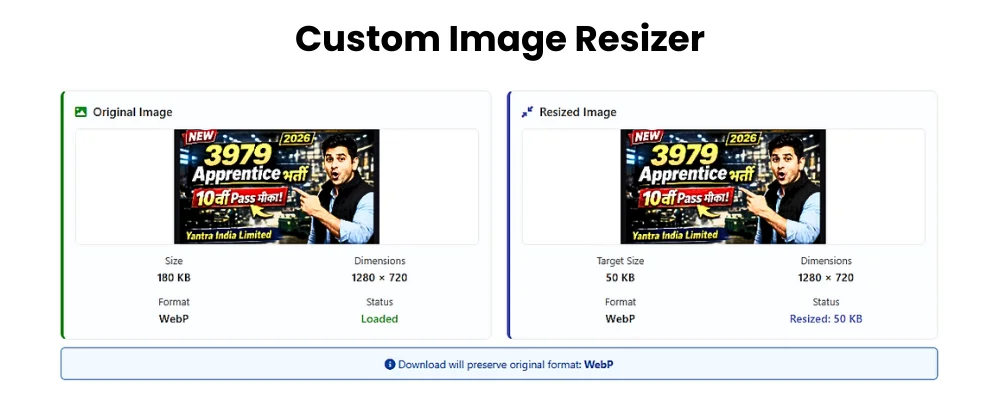
This tool allows users to resize, optimize, and convert images without uploading them to any server, ensuring complete privacy and security.
Easy Image Upload Options
The tool provides two simple and flexible ways to load images:
Upload from Device
Users can select images directly from their computer or mobile device.
Upload from URL
If the image is already available online, users can paste the image URL and load it instantly.
Once the image is loaded, the tool immediately displays a live preview, making the process fast and transparent.
Detailed Image Preview Information
After uploading, users can view complete image details in real time, including:
- File Name
- File Size
- Image Dimensions (Width × Height)
- Image Format
- DPI (Resolution)
- Color Space
This detailed preview helps users understand the image properties before resizing, which is especially useful for designers, developers, and content creators.
Advanced Image Resizing Controls
Flexible Dimension Settings
Users can resize images by adjusting width and height using multiple measurement units:
- Pixels (px)
- Inches (in)
- Centimeters (cm)
- Percentage (%)
This flexibility ensures accurate resizing for websites, print materials, social media platforms, and online forms.
Image Quality Adjustment
The built-in image quality control allows users to reduce file size while maintaining visual clarity. By adjusting the quality level, users can:
- Optimize images for faster website loading
- Reduce bandwidth usage
- Improve SEO performance
This feature is especially helpful for bloggers and website owners.
DPI (Resolution) Control
DPI (Dots Per Inch) plays an important role in image clarity, especially for printing. This tool allows users to modify DPI settings easily, making it suitable for both digital and print use.
Target File Size Option (Optional)
One of the most powerful features of this tool is the Target File Size option. When enabled, users can specify the desired output file size in KB or MB.
- This feature is completely optional
- The tool automatically balances quality and compression
- Ideal for government forms, job applications, and online submissions
Background Color Picker (Optional)
For images with transparency, the tool offers a background color picker option. Users can select any background color to replace transparency, giving more control over the final output.
Output Format Selection
Users can choose the output image format based on their needs:
- Original Format
- JPG
- PNG
- WebP
This ensures compatibility with different platforms while improving performance and storage efficiency.
Resize Image & Output Preview
After configuring all settings, users can click the Resize Image button. The tool instantly processes the image and displays a detailed output preview, including:
- Final File Size
- Output Format
- New Dimensions
- DPI
- Quality Reduction Details
This preview ensures complete transparency before downloading.
Download Image Instantly
Once satisfied, users can download the resized image with a single click. No watermarks, no limitations, and no registration required.
🔹 Key Features Section
✔ Upload images from device or URL
✔ Live image preview with full details
✔ Resize using pixels, inches, cm, or percentage
✔ Quality and DPI adjustment
✔ Optional target file size control
✔ Background color picker
✔ Convert to JPG, PNG, or WebP
✔ 100% browser-based & privacy-safe
🔹 How It Works
1️⃣ Upload your image
2️⃣ Adjust size, quality, DPI, and format
3️⃣ Preview output instantly
4️⃣ Download the resized image
No sign-up. No server upload. No data storage.
100% Privacy-First & Secure Tool
User privacy is our top priority:
- Images are never uploaded to any server
- All processing happens inside the browser
- No data is stored or tracked
This makes the tool completely safe and AdSense-friendly.
Browser-Based Technology
The Custom Image Resizer Tool is built using modern web technologies:
- HTML
- CSS
- JavaScript
This ensures fast performance, cross-device compatibility, and zero installation requirements.
Who Can Use This Tool?
- Bloggers and Content Creators
- Web Developers
- Digital Marketers
- Students
- Freelancers
- Anyone needing quick image resizing
Conclusion
The Custom Image Resizer Tool is a complete solution for resizing and optimizing images online. With advanced controls, multiple format support, browser-based processing, and strict privacy protection, it stands out as a reliable and user-friendly image resizing tool.
If you need a fast, secure, and professional image resizer, this tool is the perfect choice.